A Homelab Cautionary Tale: How Crypto Scammers Hacked My Analytics Dashboard

I've been into homelabbing for a few years now. For those unaware, a homelab is a self managed IT environment, typically used for hosting apps and learning, which in practice usually means a hodgepodge of compute, storage, and networking.
Here's my homelab:

Here's the parts of my homelab actually plugged in and doing meaningful(ish) work:

In my defence the desktop is the only Windows box in my flat and I'm damned if I'm unracking that UPS, even if the batteries have long since ceased to hold charge.
The three clustered Raspberry Pi 4s provide me with a decent enough environment to play around. I use my homelab to self-host things like my website, HomeAssistant, personal projects, and analytics to see if anyone is using any of the former. I had fun gradually bodging this together over the years until eventually my lacklustre approach to system administration best practices came back to bite me.
Discovering the Hack
Cryptocurrency and all other financial instruments with the crypto prefix are in my view at best ponzi schemes and legal sleight of hand to dodge gambling regulations and at worst climate destroying instruments of global corruption and crime. I'd thoroughly recommend Molly White's writing if you’re interested in what a mess the crypto industry is.
With all that said, you could imagine I was particularly annoyed when checking my web analytics dashboard to find that not only had someone hacked my homelab: they had somehow managed to inject a crypto casino ad into the web app html. I didn't actually get a screenshot of this but it looked a little something like this:
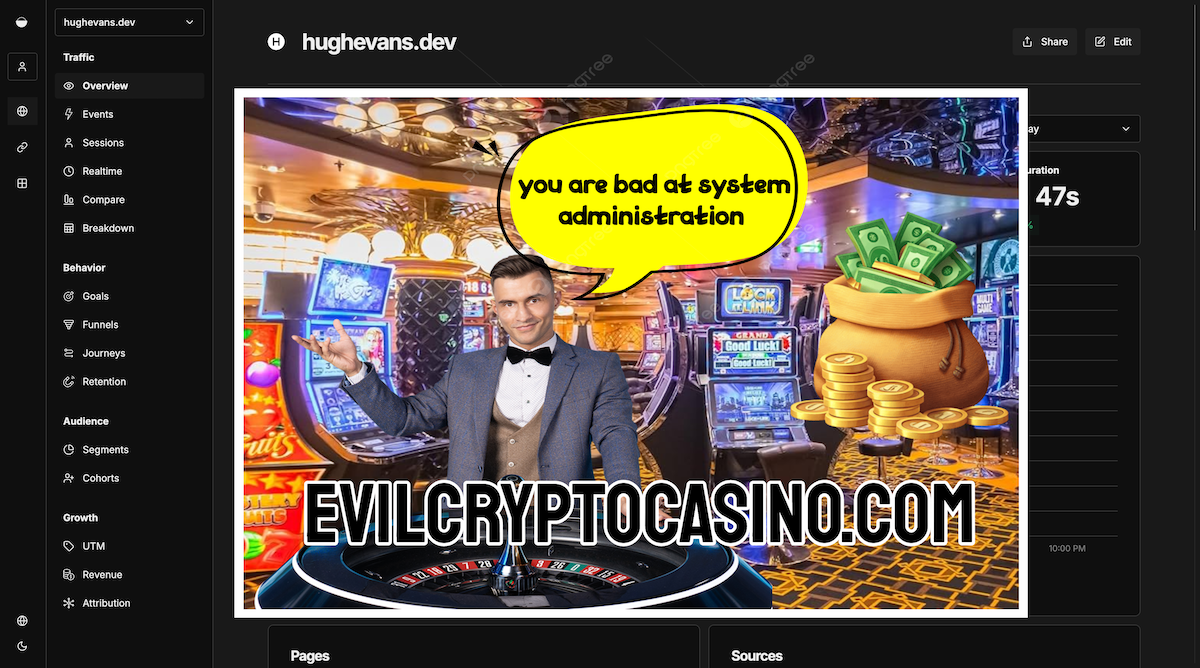
After recovering from the digital equivalent of finding a stranger in my living room, I started digging into how exactly this happened.
The Vulnerability
A quick web search turned up an issue on GitHub describing exactly what I was seeing. In short, a vulnerability in Next.js (CVE-2025-29927) allowed attackers to access compromised systems with Umami installed. Two things became immediately clear: one, that I had been very lucky, the scope of the impact on my homelab was very limited; two, I was late to the party–I hadn't noticed this issue until late February 2026, despite the vulnerability having been known about since December 2024.
Assessing the Blast Radius
I deployed apps to my homelab with Docker, which limited the attacker's access to the Umami container. Whilst the attacker gained authenticated access to my Umami dashboard, which allowed them to insert the gambling popups visible to anyone viewing that dashboard, the host server was not compromised. After stopping the container, and carefully inspecting its contents, I could see that the attacker had injected a malicious middleware.ts file into the file system. This file seemingly would have caused more serious issues, but luckily the injection was partially blocked by file permission restrictions on the container. I'd like to chalk this up to me implementing robust zero-trust across best practices™ across my entire homelab but this was mostly dumb luck.
After figuring out how the attack had compromised my Umami container I stopped it and did some digging around in the filesystem to understand the impact. Having seen in the GithHub issue evidence of malware more serious than just adding ads to my dashboard, I gave the host a thorough check to make sure it hadn't been compromised: I looked for evidence of this in the form of new shell profiles, cron jobs, and any newly created files.
All in all, after a tense couple of hours spent inspecting my homelab I was able to confirm that the hosts and other containers were completely unaffected. The analytics data in the Umami database showed no evidence of tampering, and visitor data across my personal projects had not been accessed.
Remediation
Thanks to Docker limiting the spread of the attack, remediation was fairly simple. I deleted the compromised container, rotated my Umami database credentials, and pulled the patched image:
docker rm umami
docker image pull umami
I then recreated the container with the direct port 3000 exposure removed from my Docker Compose file and updated the admin password.
I also checked in on all my other containers for any other outstanding CVEs and updated them across the board.
Lessons Learned
Despite having spent years being the "pin your versions" guy at work, I was running containers on :latest tags with no update monitoring, which led to being five months behind on the patch that would have protected me from this issue. Whilst Docker container isolation was the key factor that prevented this from being a full server compromise, I learned that I need to be more careful with my homelab security: no more default passwords for me!
Some next steps to further secure my homelab are adding a basic nginx authentication layer in front of my Umami dashboard and other private services, and setting up container update monitoring (potentially with Diun, which looks promising) to avoid missing another CVE for the best part of six months.